Thursday, September 30, 2010

Making CXF Web service accept SOAP 1.2 request


By default CXF Web Service provides SOAP 1.1 end point. In order for your web service to expose SOAP 1.2 endpoint and accept SOAP 1.2 request configure the following settings in server side CXF config file of the Web Service:

Creating SOAP 1.2 end point

<jaxws:endpoint id="auth" implementor="#AuthService" address="/cxfSearch12">
<jaxws:binding>
         <soap:soapBinding version="1.2" mtomEnabled="true"/>jaxws:binding>
<jaxws:features>
        <bean class="org.apache.cxf.feature.LoggingFeature"/>
      jaxws:features>
      <jaxws:inInterceptors>
               <bean class="org.apache.cxf.binding.soap.saaj.SAAJInInterceptor"/>  <ref bean="wss4jInConfiguration"/>
      jaxws:inInterceptors>
 jaxws:endpoint>

Calling SSL enabled CXF Web Service From Java Client

Calling a SSL enabled service which also expects UserToken to be passed can be very frustrating. It has been really painful for me to consume SSL enabled CXF service and I spent nearly 1 week to get it working.


Environment
Apache Tomcat 6.0.28
JDK 1.6
CXF 2.2.3
IBM Rational Developer 7.5.2
Spring Web 2.5.6


We deployed the CXF Web Service with SSL and installed the security certificate (self signed) on the client machine.

I was able to view the WSDL coming in the browser but the problem started when I tried to call Web Service from Java Client. I was getting “Message could not sent”. I set the proxy in RAD and imported the client certificate in the JVM. Configured following JVM arguments:

-Djavax.net.ssl.trustStore="C:\Program Files\IBM\SDP\jdk\bin\mykeystore"
-Djavax.net.ssl.trustStorePassword="password"

But this configuration did not change the error message.

My next attempt was to configure proxy arguments in addition to the above JVM arguments for my program

-Djavax.net.ssl.trustStore="C:\Program Files\IBM\SDP\jdk\bin\mykeystore"
-Djavax.net.ssl.trustStorePassword="password"
-Dhttp.proxyHost=yourproxy
-Dhttp.proxyPort=8080
-Dhttps.proxyHost=yourproxy
-Dhttps.proxyPort=8080

Now I started getting ‘SSLHandshakeException’, ‘javax.net.ssl.SSLHandshakeException: Couldn't find trusted certificate’ . It confirmed that the client was trying to use the certificate to reach Web Service but due to self signed certificate it was getting invalidated.

Then I found a link on internet which covered my problem scenario and suggested to accept whatever certificate your application is trying to use instead of JVM trying to validate it. I used following code to accept the certificate with out checking its validity and I was able to reach Web Service successfully.


import javax.net.ssl.TrustManager;
import javax.net.ssl.X509TrustManager;
import org.apache.cxf.configuration.jsse.TLSClientParameters;
import org.apache.cxf.endpoint.Client;
import org.apache.cxf.frontend.ClientProxy;
import org.apache.cxf.frontend.ClientProxyFactoryBean;
import org.apache.cxf.transport.http.HTTPConduit;
import org.springframework.context.ApplicationContext;
import org.springframework.context.support.ClassPathXmlApplicationContext;

public static void main(String[] args)
  {
ApplicationContext context = new ClassPathXmlApplicationContext("appcontext.xml");

InfoService client = (InfoService) context.getBean("client");
ClientProxyFactoryBean factory = new ClientProxyFactoryBean();
Client proxy = ClientProxy.getClient( client );
HTTPConduit conduit = (HTTPConduit) proxy.getConduit();
TLSClientParameters tcp = new TLSClientParameters();

//Creating Trust Manager
TrustManager[] trustAllCerts = new TrustManager[] {
      new X509TrustManager()
         {
          public java.security.cert.X509Certificate[] getAcceptedIssuers()
           {
              return null;
           }
          public void checkClientTrusted(
                                                      java.security.cert.X509Certificate[] certs, String authType)  {      }
             
          public void checkServerTrusted(
                                                       java.security.cert.X509Certificate[] certs, String authType)
{
     System.out.println("authType is " + authType);
     System.out.println("cert issuers");
     for (int i = 0; i < certs.length; i++) {
     System.out.println("\t" + certs[i].getIssuerX500Principal().getName());
     System.out.println("\t" + certs[i].getIssuerDN().getName());
                }
           }
    }
};
                           
                        
tcp.setTrustManagers(trustAllCerts);
conduit.setTlsClientParameters( tcp );

client.callWebServiceMethod();
  }
}

Resources used:


Read Posting from Daniel


Monday, August 02, 2010

What is JaWin and how to use it?

JaWin
The Java/Win32 integration project (Jawin) is a free, open source architecture for interoperation between Java and components exposed through Microsoft's Component Object Model (COM) or through Win32 Dynamic Link Libraries (DLLs).
For more information visit http://jawinproject.sourceforge.net/

How to use Jawin - A practical example
================================

a). If you have .tlb (COM Type Library) file available for the COM object you want to use then skip Step1 and proceed to Step3.
b). If you already have .Net component ready which you want to use from Java code then proceed to Step2:
c). If you want to develop a .NET component to be used via JAWIN then proceed to Step1:


Step1: Developing a .Net component (class library)

(a). Create an interface and before its declaration put .net attribute as given below
      [Guid("3823a63d-5891-3b4f-A460-DB0FB847075A")]
  See the code snippet below for mor einformation:

using System;
using System.Collections.Generic;
using System.Text;
using System.Runtime.InteropServices;

namespace Org.Jawin.ManageWinProcess
{
       [Guid("3823a63d-5891-3b4f-A460-DB0FB847075A")]
       public interface IWinProcessOperations
       {
       Boolean IsProcessActive(String sProcessName);
       Boolean KillRunningProcess(String sProcessName);
}

b) Now Implement the interface created above and in the implementation class before the name of class declaration, type the following attributes
[Guid("25c2f5a2-1afe-36ce-BE27-84E040F5E19A")]
[ProgId("Jawin.WinProcessOps")] // You would be using this prog id while creating an instance of this class in JAVA.


See the code snippet below for more information:


using System;
using System.Collections.Generic;
using System.Text;
using System.ServiceProcess;
using System.Text.RegularExpressions;
using System.Runtime.InteropServices;
namespace Org.Jawin.ManageWinProcess
{

         [Guid("25c2f5a2-1afe-36ce-BE27-84E040F5E19A")]
         [ProgId("Jawin.WinProcessOps")]
         public class Operations:IWinProcessOperations
         {
             public Operations(){ }
             public Boolean isProcessActive(String ProcessName)
             {
                  String machine = ".";
                  Boolean processRunning = false;
                  // Get the current processes
                   System.Diagnostics.Process[] runningProcesses = System.Diagnostics.Process.GetProcesses(machine);
                 // Find those that match the specified regular expression
                  Regex processFilter = new Regex(ProcessName, RegexOptions.IgnoreCase);
                  foreach (System.Diagnostics.Process current in runningProcesses)
                   {
                    // Check for a match.
                     if (processFilter.IsMatch(current.ProcessName))
                       {
                           processRunning = true;
                           break;
                        }
                   }


               return processRunning;
             }


public Boolean KillRunningProcess(String ProcessName)
{
String machine = ".";
Boolean processKilled = false;
// Get the current processes
System.Diagnostics.Process[] runningProcesses = System.Diagnostics.Process.GetProcesses(machine);
// Find those that match the specified regular expression
Regex processFilter = new Regex(ProcessName, RegexOptions.IgnoreCase);

foreach (System.Diagnostics.Process current in runningProcesses)
{
  // Check for a match.
  if (processFilter.IsMatch(current.ProcessName))
  {
   current.Kill();
   processKilled = true;
   break;
  }
}
return processKilled;
}


public bool KillAndStartProcess(String ProcessName)
{
String machine = ".";
Boolean processKilled = false;
// Get the current processes
System.Diagnostics.Process[] runningProcesses = System.Diagnostics.Process.GetProcesses(machine);
// Find those that match the specified regular expression
Regex processFilter = new Regex(ProcessName, RegexOptions.IgnoreCase);
foreach (System.Diagnostics.Process current in runningProcesses)
 {
  // Check for a match.
  if (processFilter.IsMatch(current.ProcessName))
  {
   current.Kill();
   break;
  }
 }
 System.Diagnostics.Process.Start(ProcessName);
 return true;
}}}


Building .NET Library
In order to build the .Net Library code you have just written from the Visual Studio IDE, configure the settings as shown below:


Important: If this setting is not configured, build would generate a DLL but the TLB file generated using regasm on .net command prompt would create .tlb file which would not expose any method in JaWin browser. So this setting is crucial.


Step 2: Creating .tlb file for the .net component

You can create a tlb file for the .net component using Assembly Registration Tool in the Visual Studio command prompt.
Syntax : Regasm /tlb “dll path with dll name”

e.g : regasm /tlb “c:\winprocess.dll” (suppose name of our dll is winprocess.dll and it is available at c:\)

The above command would generate the corresponding .tlb file.


Step 3: How to use JAWIN BROWSER and create JAWIN stub for Java for COM

Download JaWin and extract its files in a directory. Suppose JaWin is available in c:\JaWin folder. Open command prompt and reach the ‘typeBrowser’ folder in Jawin directory.

C:\Jawin\jawin-2.0-alpha1\typebrowser

And then type
java -Xmx256M -jar jawinBrowser.jar

and hit Enter. [Note: Xmx256M in the above command allocates 256 MB RAM to this process]. It would then start the Applet as shown below:


 Go to option ‘Project’ -> ‘New Project’ and type project name and then click on ‘New’ button as shown below:


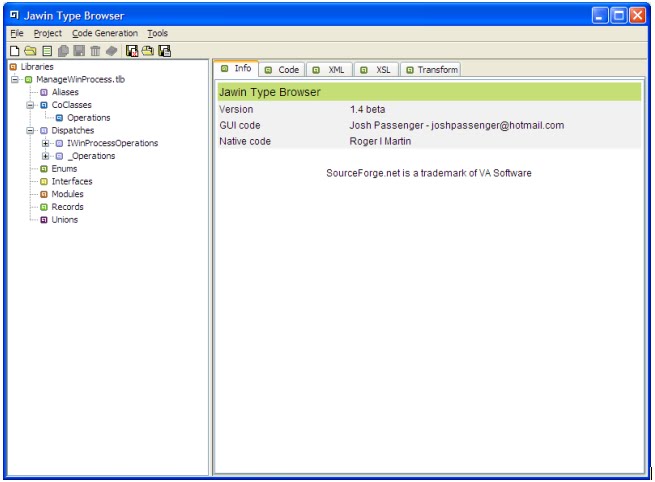
Reach to your TLB file and when you are done, the contents of your tlb would be displayed as shown below:


Expand your interface (IwinProcessOperations in this case) and then select ‘Code Generation’->’Generate Selected Code’ and it would show the corresponding JAVA code under ‘Code’ tab as shown below:


Save this code as a JAVA class. Now you can import this class and use its methods in your code.
Note: Don’t try to modify this class file.


HOW to use JAWIN stub in java application

a). Include jaWin.jar in your build path and

b). Point to the path of jaWin.dll in run configuration by adding the following string under VM arguments(if running the code in eclipse or RAD)
-Djava.library.path="c:\JawinPath"

c). If you have .NET dll, put it in your project folder and register it using regasm command. If you are using pure COM dll then use regsvr32 command to register the COM component.

d). If you are using .net dll which was exposed as a COM then you would need to copy the .net dll in JDK\bin directory otherwise your program would not be able to find the object. This step is nor required if you are using pure COM. For more information visit http://jawinproject.sourceforge.net/jawinarchitecture.html


c). Import/add the Java class (JaWin stub) file created above in your application and then use it. The below snippets shows how to use this stub.


public static void main(String[] args)

{
boolean bResult;
IWinProcessOperations ops=null; //Jawin stub for the COM component
  try
  {
   //I have used Jawin.WinProcessOps because this was mentioned as a Prog id in the //class in .net.
   // You should use the prog id of your COM accordingly.
   ops = new IWinProcessOperations("Jawin.WinProcessOps");
   }


  catch (COMException e1)
   {
    e1.printStackTrace();
    }
  try
  {
   bResult=ops.KillRunningProcess("WINWORD");
  System.out.println("Process is active " + bResult);
  }
  catch (COMException e)
  {
   e.printStackTrace();
  }
}


Monday, July 26, 2010

Various measurement factors to be considered for developing Enterprise Applications

Response


Response time is the amount of time it takes for the system to process a request from the outside. This may be a UI action, such as pressing a button, or a server API call.

Responsiveness

Responsiveness is about how quickly the system acknowledges a request as opposed to processing it. This is important in many systems because users may become frustrated if a system has low responsiveness, even if its response time is good. If your system waits during the whole request, then your responsiveness and response time are the same. However, if you indicate that you've received the request before you complete, then your responsiveness is better. Providing a progress bar during a file copy improves the responsiveness of your user interface, even though it doesn't improve response time

Latency

Latency is the minimum time required to get any form of response, even if the work to be done is nonexistent. It's usually the big issue in remote systems. If I ask a program to do nothing, but to tell me when it's done doing nothing, then I should get an almost instantaneous response if the program runs on my laptop. However, if the program runs on a remote computer, I may get a few seconds just because of the time taken for the request and response to make their way across the wire. As an application developer, I can usually do nothing to improve latency. Latency is also the reason why you should minimize remote calls.

Throughput

Throughput is how much stuff you can do in a given amount of time. If you're timing the copying of a file, throughput might be measured in bytes per second. For enterprise applications a typical measure is transactions per second (tps), but the problem is that this depends on the complexity of your transaction. For your particular system you should pick a common set of transactions.

Performance

Performance is either throughput or response time—whichever matters more to you. It can sometimes be difficult to talk about performance when a technique improves throughput but decreases response time, so it's best to use the more precise term. From a user's perspective responsiveness may be more important than response time, so improving responsiveness at a cost of response time or throughput will increase performance.

Load

Load is a statement of how much stress a system is under, which might be measured in how many users are currently connected to it. The load is usually a context for some other measurement, such as a response time. Thus, you may say that the response time for some request is 0.5 seconds with 10 users and 2 seconds with 20 users.

Load sensitivity

Load sensitivity is an expression of how the response time varies with the load. Let's say that system A has a response time of 0.5 seconds for 10 through 20 users and system B has a response time of 0.2 seconds for 10 users that rises to 2 seconds for 20 users. In this case system A has lower load sensitivity than system B. We might also use the term degradation to say that system B degrades more than system A.

Efficiency is performance divided by resources. A system that gets 30 tps on two CPUs is more efficient than a system that gets 40 tps on four identical CPUs.

Capacity

The capacity of a system is an indication of maximum effective throughput or load. This might be an absolute maximum or a point at which the performance dips below an acceptable threshold.

Scalability

Scalability is a measure of how adding resources (usually hardware) affects performance. A scalable system is one that allows you to add hardware and get a commensurate performance improvement; such as doubling how many servers you have to double your throughput. Vertical scalability, or scaling up, means adding more power to a single server, such as more memory. Horizontal scalability, or scaling out, means adding more servers.

Wednesday, May 26, 2010

Enterprise Content Management Solution (ECM) Providers

At present there are various vendors who provide Content Management solutions to their clients.

Here is a list :

IBM
IBM Content Management

Vignette (Open Text)
http://www.vignette.com/us/Solutions/Web-Content-Management

Documentum

http://www.emc.com/domains/documentum/index.htm

HummingBird

Newgen
http://www.newgensoft.com/in/en/enterprise_content_management

LiveLink
http://www.opentext.com/2/sol-products/sol-pro-llecm10.htm

Microsoft Share Point
http://sharepoint.microsoft.com/en-us/Pages/default.aspx

Alfresco Content Management
http://www.alfresco.com/


There are many more which can be added into list but these are the ones which I have heard about the most.

Monday, April 19, 2010

WPF 4 - New/Enhanced features

WPF Tracing Support
http://10rem.net/blog/2010/04/12/wpf-4-release-a-guide-to-the-new-features

ClearType
http://research.microsoft.com/en-us/projects/cleartype/

Custom Dictionaries APIs
WPF Text Team Blog post on Custom Dictionaries in WPF 4

Pixel Shader 3 Support
Create Custom Pixel Shader Effects for
WPF http://windowsclient.net/learn/video.aspx?v=296117

Removal of legacy Bitmap Effects
The old legacy bitmap effects (bevel, drop shadow, blur etc.) are still present, but there's zero implementation. The effects that have shader versions (blur, drop shadow) get forwarded to the shader implementation. The other effects (bevel, for example) simply do nothing. Your code will compile, but the effects themselves are no-ops. In .NET 3.5sp1, they were marked as deprecated, so this is not surprising.
Bitmap effects are software-only, and couldn't be hardware accelerated. One of the biggest performance issues with old WPF applications was use/overuse of bitmap effects. Pixel shader-based effects are much more performant. I'm glad to see we aren't afraid to cull when we come up with something better.
The replacement effects are just as easy to use as the old effects, and will even render on the design surface.
http://10rem.net/blog/2010/04/12/wpf-4-release-a-guide-to-the-new-features

Tuesday, April 06, 2010

FileNet Image Manager Active Edition

It’s a solution that combines IBM FileNet Image Services, which is being used by thousands of organizations to transform their document image management, and IBM FileNet Content Manager. This combination provides you with the option to extend the management of massive volumes of document images with business process management (IBM
FileNet BPM), eForms management (IBM FileNet Forms Manager), email management (IBM FileNet Email Manager) and more.

Image Manager Active Edition allows you to link content with business processes, activating that content so that it drives workflows within your organization. This level of integration activates your business, enabling you to work with content that makes a positive impact within seconds of a document image reaching your
system, rather than the weeks it can take with paper or other software solutions.

For more info visit http://www-01.ibm.com/software/data/content-management/filenet-image-manager/

Microsoft Windows Presentation Framework (WPF)

The Windows Presentation Foundation, WPF, provides a unified framework for building applications and high-fidelity experiences in Windows Vista that blend application UI, documents, and media content. WPF offers developers 2D and 3D graphics support, hardware-accelerated effects, scalability to different form factors, interactive data visualization, and superior content readability.

Nice book on Microsoft WPF
Windows Presentation Foundation Unleashed (WPF)

Wednesday, February 10, 2010

Microsoft Share Point

Share point is one of the Microsoft Web Server products. It is a web-based collaboration, document management, and process management product that allow us to build an enterprise portal. It aims at following:

a). To improve team productivity by allowing staff to collaborate efficiently.

b). To provide the staff with the information they need.

c). To provides us with the framework to create websites that not only provide access to documents and shared workspaces but also allow other web-based applications such as wikis and blogs to be created.

d). It also allows elaborate workflows to be created, allowing business processes to be monitored and actioned.

Share point refers to two products:

a). Windows SharePoint Services (WSS)

It is a free add-on for Windows server which provide following features:

  1. Wiki
  2. Workflows
  3. Blog
  4. Document management with version control
  5. Team sites
  6. RSS support etc.

b). Microsoft SharePoint Server

It is a product purchased separately from WSS and adds following features to the basic features discussed above:

  1. Improved Document Management
  2. Project Management
  3. Enterprise Search

Share point is suited for medium-sized companies or large enterprises.

Lock, Save and Unlock Methods in Capture professional

The Lock, Unlock, and Save methods of a RepObject are used to make changes to the RepObject.To change a RepObject you must lock it, make the change, save it, and then unlock it. If you try to lock a RepObject already locked by another user, you will receive an error. The following code renames a RepObject:

Dim oBatch as RepObject
If oBatch.Lock then
oBatch.Name = “newname”
oBatch.Save
oBatch.Unlock
EndIf

The Lock, Save and Unlock methods each return a boolean value indicating success or failure. Locking a RepObject locks all the children of that RepObject. Saving a RepObject saves all of the children of that RepObject. Each call to the Lock method must eventually be matched with a call to the Unlock method by the same user before a RepObject is fully unlocked. The RepObject manages an internal lock count that is incremented by the Lock method and decremented by the Unlock method. The RepObject is deemed no longer locked when this lock count reaches zero. For example, if an application calls the Lock method twice on a given RepObject, it must eventually call Unlock twice on the same RepObject

Thursday, January 21, 2010

DLL names for various Capture repositories

Below are the repository types and their corresponding dll file names

Local Repository ....................... RILLocal.dll
Shared repository ....................... RILShared.dll
CE Repository ....................... RILCE.dll
Shared CE Repository ....................... RILSharedCE.dll
Image Services Repository ....................... RILBES34.dll
Offline IS Repository ....................... RILOfflineIS.dll
Shared CS Repository ...................... RILSharedCE.dll
Shared Offline IS Respository ...................... RILSharedOLIS.dll

Monday, January 04, 2010

Using IBM MQ from a windows form based .NET application

In order to connect to IBM MQ from a windows form .NET application install the following two softwares:
1). IBM WebSphere MQ client + Fix Pack 6.0.2
2). IBM Message Service Client for .NET (Available for download from http://www-01.ibm.com/support/docview.wss?rs=171&uid=swg24011756)

Saturday, December 12, 2009

Internet Connection is being shown but not openeing any site - Ubuntu 9.X

Open FirexFox in Ubuntu and type about:config
Find the entry network.dns.disableIPv6.
Double click this entry would change its value to 'true'
Rebooot pc and internet would work.

Please visit the below link for more information
https://help.ubuntu.com/community/WifiDocs/WirelessTroubleShootingGuide

Use Ubuntu with Windows Vista 32 Bit - How to solve booting problem

Problem: Installed Ubuntu 9.X on a USB from a pc having Windows Vista (SP2-32bit) installed. After installation of Ubuntu tried to boot Windows by selecting HDD from Bootup menu. It failed and prompted following :
------------------------
GRUB LOADING
Error:no such disk
Grub Rescue>
------------------------
Connected the USB which I used to install UBUNTU and it displayed boot up menu from GRUB. This menu showed options related to Ubuntu and one option for Windows Vista. When selected Windows Vista option it booted up normally.

Solution : This was happening because the Windows Boot Loader was changed to GRUB Loader in BIOS. I followed below steps to change Boot Loader from GRUB to WINDOWS.
1). Started Pc with the WINDOWS VISTA media.
2). Selected 'Repair mode'.
3). Select Command prompt and run command bootrec/fixmbr to fix the master boot record.
Visit following links for more information
http://support.microsoft.com/kb/927392 and
http://www.bleepingcomputer.com/tutorials/tutorial147.html

Tuesday, October 20, 2009

The repository database is already associated with the CE server.

Scenario : We were using shared content engine server 4.5 through Capture Professional 5.2 and were able to perform all the required operations. The database we were using is SQL Server 2005. Due to some migration activity we were needed to drop and recreate the existing object stores. After it happened we were not able to open and connect to the CE repositories and were getting following error:


Solution : When we configure a Shared CE repository for the first time it creates few tables for house keeping purpose. These tables are only used by Capture internally. Among these table , there is one table named 'DBInfo'. It has following structure :

RowID PropertyName PropertyValue
1 UsageType Repository
2 RepositoryType Shared CE Repository
3 RepositoryConnection {GUID Value}
4 CapProVersion {Capture Pro Version}

Follow the below steps:
a). In this table update the GUID Value to the new GUID Value of object store.
b). Delete the DSN pointing to the sql database for your CE Shared repository.
c). Delete the capture repository using Capture Manager.
d). Create DSN accessing the same SQL Database.
e). Configure the same CE Shared repository again.

Now open Capture Professional. you should be able to see your repository.

Wednesday, October 07, 2009

How big (Size) a batch can be in Capture Professional?

Answer :
There are limits to the batch size when using File Import in Capture Professional. These limits are not configurable.Here are the Maximum limits:
* Pages per Document - 1000
* Pages per Batch - 5000
Recommendations
* Limit the size of a batch to less than 50 pages of similar documents, when possible, to ensure the batch is manageable for both the operator and the system.
* If the batch is assembled as a single document, and is running into the 1000 page limit, consider breaking the batch into several documents. This both makes the batch more manageable and increases the page limit up to the batch limit of 5000.

Tuesday, October 06, 2009

Capture Manager does not show any object store.

Environment : FileNet Enterprise Manager 4.5, FileNet Capture Professional 5.2 and WSE 3.0
OS: Windows XP SP3
Problem : Open Capture Manager and then select repository type 'Shared Content Engine. When click 'Add' button nothing happens.It does not show CE credentials dialog and hence does not display any CE object store. But Able to see CE object stores through Enterprise Manager.

Solution: This happens if 'Compatibility URL' is not specified while installing Enterprise Manager. Provide URL at the time of installation and change it if required by editing the CompatibilityURL registry entry:

HKEY_LOCAL_MACHINE\SOFTWARE\FILENET\ECM\CONTENT ENGINE\CLIENT

Wednesday, September 30, 2009

How does Panagon IDM Desktop communicates with FileNet Image server.

Answer : IDM desktop uses a NCH (port) to locate the object from doc services and uses a COR (port) 32769/tcp to transfer them.

Wednesday, August 19, 2009

Filenet capture has encountered an error see the event log meessage

Problem : FileNet Capture crashed on opening after configuring it for the first time. Created new SQL Server 2005 databases and configured DSN for them. In Capture Manager while configuring the Capture repository, Specify this DSN. Once the repository is set, start Capture Professional and it display following error :

"Filenet capture has encountered an error see the event log meessage."

Solution : The databases were created with the default collation and were creating the problem. So the databases were recreated using appropriate collation. Visit the link below for more information on collation :
http://msdn.microsoft.com/en-us/library/aa174903(SQL.80).aspx

Wednesday, August 12, 2009

Retrieve to cache failed

Problem : User gets 'Retrieve to cache failed' error while trying to retrieve document from IS using IDM Desktop.
Solution : This error indicates that the document retrieval failed from MSAR to Page Cache.
1. Your Alternative IS Page Cache is not configured/spelled correctly.
2. Your Alternative IS Page Cache machine is not up and running.
3. Could be Network issue (Ping Cache machine to see if it is alive)
4. If you don't need the Alternative IS Page Cache at all, reset it to default (use the primary default one)
To access this Alternate IS Page Cache, follow this instruction path:
IDM Configure --> Additional Preferences... -> -> Alternative IS Page Cache --> Then either add the 3 part name or click Restore Default.
Note:
3 part name format: ::
e.g: page_cache2:Spot:FileNET